What is my Purchase Email Address?
It should be the Payment email address (Paypal email) that you input upon checkout.
Or try to input your WarriorPlus email address.
I Bought Multiple cPanel Using A Different Email?
Then you would have multiple User Accounts in Cloud4WP.
You can login to each account using its own unique Purchase Email Address.
Need Further Assistance?
Log In To Your Cloud4WP Account
Please enter your Purchase Email Address to continue.
FAQs and Quick Guide
How to Add or Connect More Domains to My cPanel?
The explanation is a bit long, so I wrote an article about it here:
https://wpthemeplugin.zendesk.com/hc/en-us/articles/13180936528281
How to Migrate WP Site From Other Hosting to My Cloud4WP cPanel?
The explanation for WP site transfer is a bit long, so I wrote an article about it here:
https://wpthemeplugin.zendesk.com/hc/en-us/articles/900006408843
How Does the Automatic SSL (HTTPS) Actually Work?
Every domains and subdomains you create or add, will have SSL automatically within 5-10 minutes.
So if you before you create a new WordPress installation using Softaculous for example, it is better to wait for about 5 or 10 minutes to allow cPanel some time to initiate the automatic SSL.
After 5-10 minutes, go add a fresh WP installation with Softculous and select the SSL version for that WP installation.
After that login to your WP site and add the "Really Simple SSL" plugins from Plugins -> Add New.
https://wordpress.org/plugins/really-simple-ssl/
Activate the plugin and click Enable SSL button right away from the plugin setting/notice.
That plugin will force SSL on your WP site..
How Do I "Resell" or "Give" the cPanel to My Client?
There two most common cases our users usually do.
1. If You're Building A Website For A Client
Once your client got a domain name for their website, then you will use that domain when claiming or creating your new cPanel.
After you receive the cPanel login information from your cPanel list (by clicking the "View All My cPanel" button), then you can start creating the website for your client in that cPanel.
When your website creation is done, then you simply pass/give the website login access as well as the cPanel login access to your client.
It is up to you if you want to bill or invoice your client a monthly or yearly charge for the cPanel hosting. But if you do charge an additional fees for hosting to your client, you will make more profit..
.. Because the cPanel only costed you a one-off payment if you chose Cloud4WP Lifetime package
Having said that, it means one cPanel will only be good for one client.
So if you deal with multiple clients, you should have multiple cPanel too.
And that is why some of our users, they buy Cloud4WP multiple times. When they buy 5 cPanel accounts, it means they will be able to deal and handle 5 clients where each of them has their own cPanel.
2. If You're Selling Your Website To Another Person (Site Flipping)
When you flip/sell your website, after your buyer finish the payment, you should send the website login details as well as the Cloud4WP cPanel login details to your buyer.
It is up to you if you want to charge additional "hosting" fee to your buyer.
The most important thing is, you've paid one-off payment for Cloud4WP Cpanel (if you chose the Lifetime plan).
So if you do charge "hosting" fee to your buyer, you will make more profit.
Can I Change the Main Domain of My cPanel In The Future?
Yes, of course.
However do note that normally we suggest it "as a last resort" for solving cPanel problem.
Because changing the "cPanel Main Domain" can cause:
1.) Risk of changing Cpanel email path, database name and file path that may results to disruption in existing websites or email address in Cpanel
2.) WP-based website of new primary domain to displays the content of the previous primary domain.
If you would like to change your cPanel Main Domain (Primary Domain), do let us know.
Maybe your Main Domain has expired and you don't want to renew it?
Do let us know by contacting our support with your new domain, and we'll have it sorted out for you.
Welcome, !
Thank you for joining Cloud4WP, one of the longest Lifetime Cloud cPanel WordPress hosting providers on earth.
What are you going to do today?
Create A New cPanel Account
The initial step is to get a domain name for your Lifetime cPanel Hosting. You can buy a domain name from any registrars: GoDaddy, NameCheap, Name.com, etc.
Once you have a domain name ready, please update nameservers of your domain according the server location you want:
| Server Location | Nameserver 1 | Nameserver 2 |
|---|---|---|
| Dallas IP: 198.252.xxx.xxx |
ns1.host4wp.biz | ns2.host4wp.biz |
| New York IP: 172.96.187.xxx |
ns1.cloud4wp-s6.com | ns2.cloud4wp-s6.com |
| Los Angeles IP: 140.99.245.xx |
ns1.cloud4wp-s15.com | ns2.cloud4wp-s15.com |
IMPORTANT: Please be sure this step is done. Domain (DNS) propagation can take anywhere from 1 hour to 48 hours. So if you do this first step correctly, then you will speed up the Nameserver propagation.
Once you have set the domain nameservers, fill in the form below to create your cPanel account:
How Long Until My cPanel Creation Complete?
As stated on the product page, every cPanel account will pool resources from multiple virtual server instances of physical servers.. So if a hardware issue arises, your site is automatically switched to another server instances, preventing unnecessary downtime.
Currently we have 23 27 virtual cloud instances as of July 2026.
In a normal sequence, it takes around 4-5 hours to arrange those 20+ instances for each cPanel. This time-frame also giving the required time for the nameservers to propagate properly (see what is Nameserver propagation)
So if you click the "Start cPanel Creation" button above at 10 AM, it should be completed at around 2 PM - 3 PM, or later on. Everything depends on the creation queue and whether the nameservers propagation has been completed or not.
However, during a busy sequence, it may takes longer - hence the "first come, first served".
The good news is, you will never see a cPanel creation takes more than 24 hours.
FAQs and Quick Guide
How to Add or Connect More Domains to My cPanel?
The explanation is a bit long, so I wrote an article about it here:
https://wpthemeplugin.zendesk.com/hc/en-us/articles/13180936528281
Note: The article above is for non-CloudFlare domain names. If your domain names are from CloudFlare, read this explanation guide.
How to Migrate WP Site From Other Hosting to My Cloud4WP cPanel?
The explanation for WP site transfer is a bit long, so I wrote an article about it here:
https://wpthemeplugin.zendesk.com/hc/en-us/articles/900006408843
How Does the Automatic SSL (HTTPS) Actually Work?
Every domains and subdomains you create or add, will have SSL automatically within 5-10 minutes.
So if you before you create a new WordPress installation using Softaculous for example, it is better to wait for about 5 or 10 minutes to allow cPanel some time to initiate the automatic SSL.
After 5-10 minutes, go add a fresh WP installation with Softculous and select the SSL version for that WP installation.
After that login to your WP site and add the "Really Simple SSL" plugins from Plugins -> Add New.
https://wordpress.org/plugins/really-simple-ssl/
Activate the plugin and click Enable SSL button right away from the plugin setting/notice.
That plugin will force SSL on your WP site..
How Do I "Resell" or "Give" the cPanel to My Client?
There two most common cases our users usually do.
1. If You're Building A Website For A Client
Once your client got a domain name for their website, then you will use that domain when claiming or creating your new cPanel.
After you receive the cPanel login information from your cPanel list (by clicking the "View All My cPanel" button), then you can start creating the website for your client in that cPanel.
When your website creation is done, then you simply pass/give the website login access as well as the cPanel login access to your client.
It is up to you if you want to bill or invoice your client a monthly or yearly charge for the cPanel hosting. But if you do charge an additional fees for hosting to your client, you will make more profit..
.. Because the cPanel only costed you a one-off payment if you chose Cloud4WP Lifetime package
Having said that, it means one cPanel will only be good for one client.
So if you deal with multiple clients, you should have multiple cPanel too.
And that is why some of our users, they buy Cloud4WP multiple times. When they buy 5 cPanel accounts, it means they will be able to deal and handle 5 clients where each of them has their own cPanel.
2. If You're Selling Your Website To Another Person (Site Flipping)
When you flip/sell your website, after your buyer finish the payment, you should send the website login details as well as the Cloud4WP cPanel login details to your buyer.
It is up to you if you want to charge additional "hosting" fee to your buyer.
The most important thing is, you've paid one-off payment for Cloud4WP Cpanel (if you chose the Lifetime plan).
So if you do charge "hosting" fee to your buyer, you will make more profit.
Can I Change the Main Domain of My cPanel In The Future?
Yes, of course.
However do note that normally we suggest it "as a last resort" for solving cPanel problem.
Because changing the "cPanel Main Domain" can cause:
1.) Risk of changing Cpanel email path, database name and file path that may results to disruption in existing websites or email address in Cpanel
2.) WP-based website of new primary domain to displays the content of the previous primary domain.
If you would like to change your cPanel Main Domain (Primary Domain), do let us know.
Maybe your Main Domain has expired and you don't want to renew it?
Do let us know by contacting our support with your new domain, and we'll have it sorted out for you.

Cheers,
Leonardus (WpThemePlugin.com)
Please NOTE:
1.) Cloud4WP hosting services are intended for legal use only. So please do not host any NSFW content, pornographic content, drugs and other content which is considered as either fully illegal or semi-illegal in the United States of America.
2.) Just like any other cPanel services, your account may not be used as a file storage and/or backup space for files/archives other than backups of databases, websites, etc. Cloud4WP is a website hosting, not a file storage hosting. To host your precious files/videos/images/etc. not related to your website projects, we strongly suggests to use other services such as Amazon S3/CloudFront, Dropbox, Mediafire, etc.
3.) All Cloud4WP hosting plans are entitled with 500,000 inodes. This means even if your cPanel account still has tons of available storage, but might be limited with inodes limit. The 500,000 inodes space on Cloud4WP is already way higher than most other shared hosting out there, EG: compared to 100,000 limit on Hostgator and 50,000 limit on Bluehost.
ALL TRADEMARKS AND LOGOS ARE THE PROPERTY OF THEIR RESPECTIVE OWNERS. THIS SITE AND THE PRODUCTS AND SERVICES OFFERED ON THIS SITE ARE NOT ASSOCIATED, AFFILIATED, ENDORSED, OR SPONSORED BY ANY BUSINESS LISTED ON THIS PAGE NOR HAVE THEY BEEN REVIEWED TESTED OR CERTIFIED BY ANY OTHER COMPANY LISTED ON THIS PAGE.
THE RESULTS SHOWN ARE NOT TYPICAL AND RESULTS WILL VARY BASED ON YOUR MARKET, YOUR EFFORTS, COMPETITION AND MANY OTHER FACTORS OUTSIDE OF OUR CONTROL.
Copyright © Cloud4WP. All Rights Reserved.
Refer anyone to purchase Cloud4WP Lifetime Hosting thru your unique link, and when they buy, you earn 50% of their purchase amount paid instantly to your WarriorPlus wallet.
FIRST STEP
Get your unique affiliate link from this page: https://warriorplus.com/aff-offer/o/l48w8l
SECOND STEP
Click the "Request Approval" button.
On the request note make sure you input this code
Click the "Request Offer" button, and you should be approved automatically!
THIRD STEP
Share and promote your unique affiliate link every day online!
Here are several promotion tools you can use:
If you need another lifetime cPanel hosting from Cloud4WP, you may also use your own affiliate link - but you should make a purchase with a secondary WarriorPlus account.
Simply create a new WarriorPlus account (use a different email address than your first account, EG: use your spouse email and ID), complete all ID verification from WarriorPlus, and you are all set.
Also make sure to use another browser, example normally you browse with Chrome, then if you want to make a purchase with your own affiliate link, open the link with Firefox..
.. After that visit your affiliate link, and make a purchase using your secondary account.
If you bought your domain from CloudFlare, you cannot change the nameservers..
.. Instead, you must keep Cloudflare's default nameservers and point your domain to your cPanel by copying your cPanel IP address into Cloudflare's DNS settings.
FIRST STEP
Go to the "Create New cPanel" section -> input your domain name and the server location -> after that click the Start cPanel Creation button.
SECOND STEP
Wait until the cPanel creation is finished..
.. Click the "View All My cPanel" button and find the cPanel IP address.
THIRD STEP
- Log in to your Cloudflare Dashboard and select your domain.
- Go to the DNS tab and click Records.
- Create or edit an A record for your root domain (@ or yourdomain.com)
- Set the IPv4 address to your cPanel IP address.
- Create or edit an A record for www pointing to the same cPanel IP address.
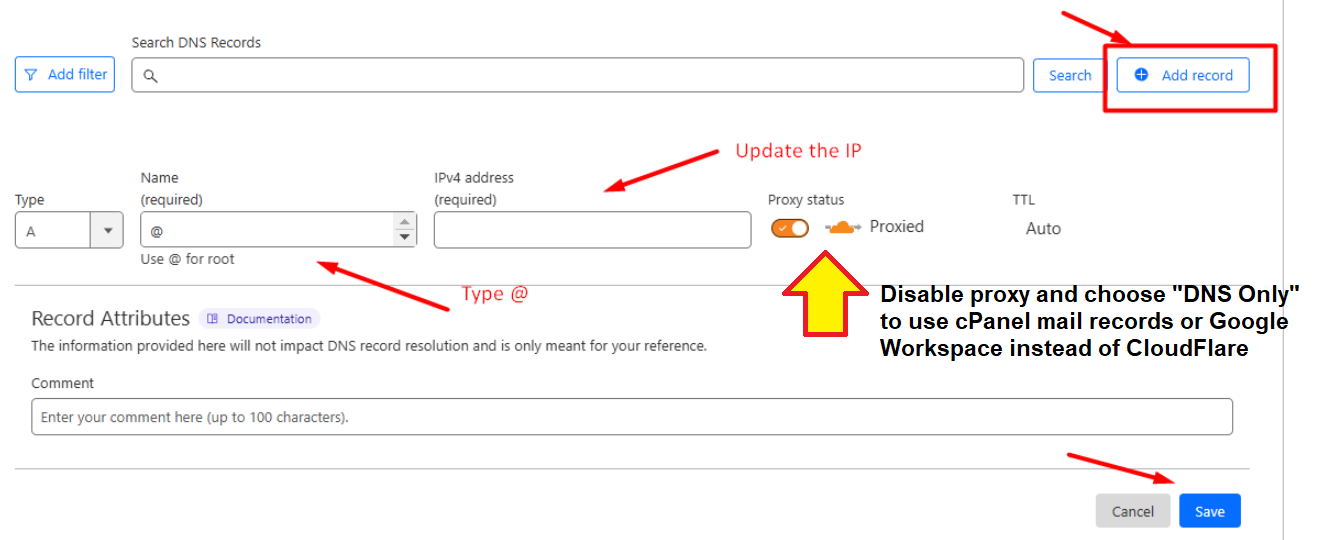
Remember to click the "Save" button after that.
By default, that's the only setup needed to connect a CloudFlare domain to your cPanel.
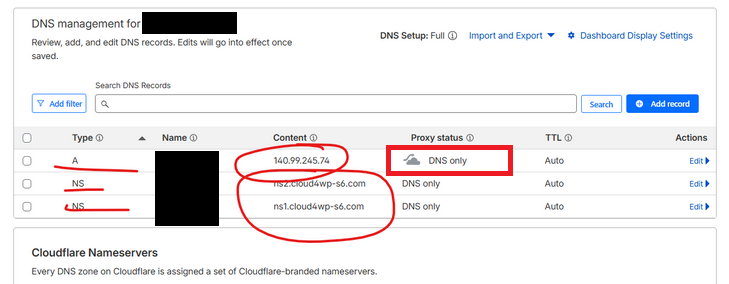
The last step is to just simply wait until the DNS propagates successfully which could take anywhere between 1 hour to 24 hours to finish.
While waiting for the DNS propagation to finish, you can still log in to your cPanel using the provided "cPanel Alternative URL", which looks like this: 198.252.xxx.xxx/cpanel
Credits are like funds to claim your cPanel purchase.
1 credit equals to 1 cPanel account creation.
If a single purchase granted you with 2 credits, you can either use it to claim 2 cPanel accounts, or 1 cPanel account with 1 free .COM domain.